

A practical guide to planning your website, organizing your content, and avoiding delays once development begins.
A new website can strengthen your credibility, generate leads, support customers, and create new business opportunities. However, a successful website requires more than an attractive design. It starts with a clear understanding of what the website should accomplish and what your development team will need from you.
Preparing the following items before development begins can reduce revisions, control costs, and help your new website launch smoothly.
1. Define Your Business Goals
Begin by identifying the primary purpose of your website. Although a website can support several objectives, establishing your priorities will guide decisions about its structure, content, features, and calls to action.
Your objectives might include:
- Generating qualified sales leads
- Selling products online
- Booking appointments or consultations
- Explaining your services
- Recruiting employees
- Supporting existing customers
- Increasing visibility in search results
Turn your priorities into measurable goals whenever possible. For example, you may want the site to generate a certain number of inquiries, increase appointment requests, or improve traffic to an important service page.
2. Understand Your Target Audience
Your website should be designed around the needs of your customers rather than the preferences of your internal team.
Before the project begins, document:
- Who your ideal customers are
- Where they are located
- Which industries or markets they represent
- The problems they are trying to solve
- The questions they ask during the buying process
- The information they need before contacting you
For a B2B website, navigation and content should help visitors identify the right information based on where they are in their buying journey.
3. Gather and Organize Your Content
Content is one of the most common causes of website project delays. Before development starts, determine what already exists, what must be updated, and what needs to be created.
Gather the following materials:
- Company overview
- Service and product descriptions
- Team biographies
- Customer testimonials
- Case studies
- Frequently asked questions
- Careers information
- Contact information
- Videos and downloadable resources
- Professional photography
- Logos and brand files
Assign an owner and review deadline to every unfinished content item. Your website developer may be able to assist with copywriting, photography, or editing, but those responsibilities should be included in the project scope.
4. Draft a Sitemap
A sitemap is a list of the pages that will make up your website. A typical business website might include:
- Home
- About
- Services
- Industries
- Case Studies
- Resources or Blog
- Careers
- Contact
Organize the sitemap around how customers look for information. Avoid creating a navigation structure that reflects internal departments or terminology that visitors may not understand.
Consider what action someone should take after visiting each page. That action might be requesting a quote, booking a consultation, calling the business, subscribing to a newsletter, or visiting another relevant page.
5. Prepare Your Brand Guidelines
Your development team will need access to the visual and written elements that define your brand.
Prepare:
- Logo files in appropriate formats
- Brand colours
- Approved fonts
- Photography or illustration guidelines
- Icon styles
- Messaging guidelines
- Examples of approved marketing materials
- Preferred tone of voice
If formal brand guidelines do not exist, identify several examples of websites and marketing materials that reflect the desired style. Explain specifically what you like about each example rather than asking the developer to duplicate another company’s website.
6. Secure Your Technical Assets
Determine who owns and manages the systems connected to your current website.
Important assets include:
- Domain name
- Domain registrar account
- DNS records
- Website hosting
- SSL certificate
- Business email
- Content management system
- Existing website backups
- Analytics accounts
- Connected third-party services
Avoid registering important business assets under an employee’s personal account. Document ownership and retain administrative access in an approved company-controlled location.
7. Document Required Features
Create a list of everything visitors and administrators need to do through the website.
Potential requirements include:
Lead generation
- Contact forms
- Quote requests
- Consultation booking
- Newsletter registration
- Downloadable resources
E-commerce
- Product catalogue
- Shopping cart
- Online payments
- Customer accounts
- Shipping and inventory integrations
Customer support
- Live chat
- Frequently asked questions
- Knowledge base
- Customer portal
- Support ticket submission
Business integrations
- Customer relationship management platform
- Email marketing system
- Appointment calendar
- Enterprise resource planning system
- Payment processor
- Marketing automation platform
Separate requirements into must-have, should-have, and future-phase categories. This makes it easier to protect the project’s budget while preserving a roadmap for future improvements.
8. Prepare for Search Engine Optimization
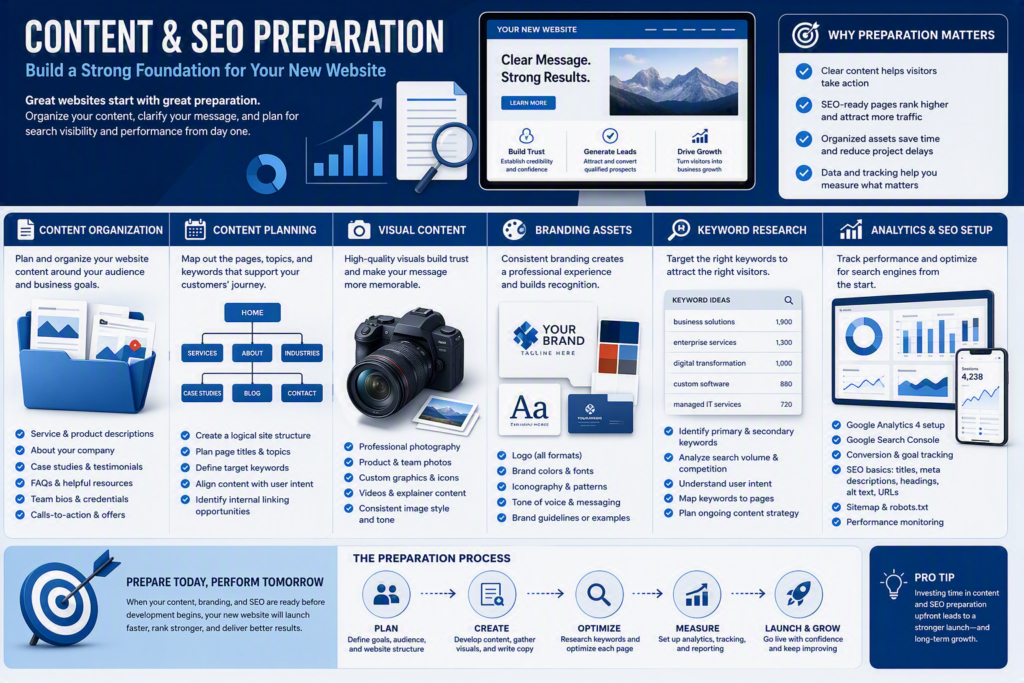
Search engine optimization should be considered during planning rather than added after the website launches.
Before development, identify:
- Priority services and products
- Target geographic markets
- Keywords potential customers use
- Important pages on the existing website
- Competitors appearing in search results
- Existing backlinks
- Pages receiving organic traffic
Basic on-page SEO should include descriptive page titles, meta descriptions, headings, image alternative text, internal links, and search-friendly URLs.
If an existing website is being replaced, prepare a redirect plan so valuable pages do not simply disappear when the new site launches.
9. Define Analytics and Conversion Tracking
Decide what success looks like and how it will be measured.
Depending on your goals, track:
- Form submissions
- Phone calls
- Appointment bookings
- Online purchases
- Newsletter registrations
- Resource downloads
- Traffic sources
- Engagement with important pages
Confirm who owns the analytics accounts and who will review the reports. Tracking should be tested before launch so that your team has dependable data from the first day.
10. Address Accessibility, Privacy, and Security
Accessibility and security should be included in the project requirements, testing, and ongoing maintenance plan.
Discuss:
- Keyboard navigation
- Descriptive image alternative text
- Colour contrast
- Clear headings and labels
- Accessible forms
- Privacy notices
- Cookie consent
- Secure form handling
- Administrative permissions
- Software updates
- Backups and recovery
Accessibility cannot be guaranteed by completing a single checklist, but established accessibility checklists can help teams test content, keyboard access, page structure, forms, and other important elements. [webarctech.com]
Consult the appropriate legal or privacy professional to determine which specific requirements apply to your organization, industry, and location.
11. Plan Review and Approval Responsibilities
Website projects require frequent decisions. Identify who will:
- Approve the sitemap
- Review written content
- Approve designs
- provide technical access
- Review legal and privacy language
- Perform final testing
- Authorize the launch
Gathering feedback from stakeholders is important, but final decision-making authority should remain clear. Establishing approval responsibilities prevents contradictory feedback and avoidable revision cycles.
A business requirements document can help define objectives, scope, stakeholders, requirements, schedules, costs, constraints, and expected benefits.
12. Prepare for Testing and Launch
Before launch, test the website for:
- Mobile responsiveness
- Browser compatibility
- Forms and notifications
- Links and downloads
- Page speed
- Spelling and content accuracy
- Analytics and conversion tracking
- Search engine visibility
- User permissions
- Accessibility
- Backups and recovery
- Redirects from the previous website
13. Plan for Maintenance and Marketing
Launching your website is the beginning of its operational life, not the end of the project.
Determine who will be responsible for:
- Content updates
- CMS and plugin updates
- Software security patches
- Website backups
- Performance monitoring
- Analytics reporting
- Accessibility reviews
- SEO improvements
- Publishing new content
You should also prepare a post-launch promotional plan. This may involve updating business listings, announcing the website through email and social media, publishing new resources, running digital advertising, or developing ongoing SEO content. Post-launch maintenance and marketing are both things to consider for post-launch.
Website Readiness Checklist
Before starting your new website project, confirm that you have:
- Defined the website’s goals and KPIs
- Documented the target audience
- Drafted the sitemap
- Inventoried existing content
- Assigned owners for missing content
- Gathered brand assets
- Confirmed domain and hosting ownership
- Documented required features
- Identified integration requirements
- Established SEO priorities
- Defined analytics and conversion tracking
- Reviewed accessibility, privacy, and security needs
- Assigned reviewers and final approvers
- Created a launch testing plan
- Assigned ongoing maintenance responsibilities
- Prepared a post-launch marketing plan
A Little Preparation Goes a Long Way
A successful business website starts with a solid plan. By defining your objectives, organizing your content, documenting technical requirements, and assigning clear responsibilities, you give your web development team what it needs to build an effective website.
The result is not simply a more attractive digital presence. It is a website designed to support your customers, communicate your value, and contribute to measurable business growth.


1 Comment
Dorothy Finley
Lorem ipsum dolor sit amet, consectetur adipiscing elit, sed do eiusmod tempor incididunt ut labore et dolore magna aliqua. Nisl tincidunt eget nullam non. Quis hendrerit dolor magna eget est lorem ipsum dolor sit.
Comments are closed.